Download ClickNClaw
An early build for the community that holds the project's token.
Connect your Solana wallet to see if you're in. One quick sign-in unlocks the downloads. No transactions,
ever.
1 · Connect your Solana wallet
No compatible Solana wallet detected in this browser. Install one of the following and refresh the page:
2 · Pick your platform
Connect your wallet first. Downloads unlock automatically when a qualifying balance is confirmed.
3 · First launch · pass the security prompt
First launch triggers a security prompt on macOS and Windows. Here's how to pass it in about 10 seconds.
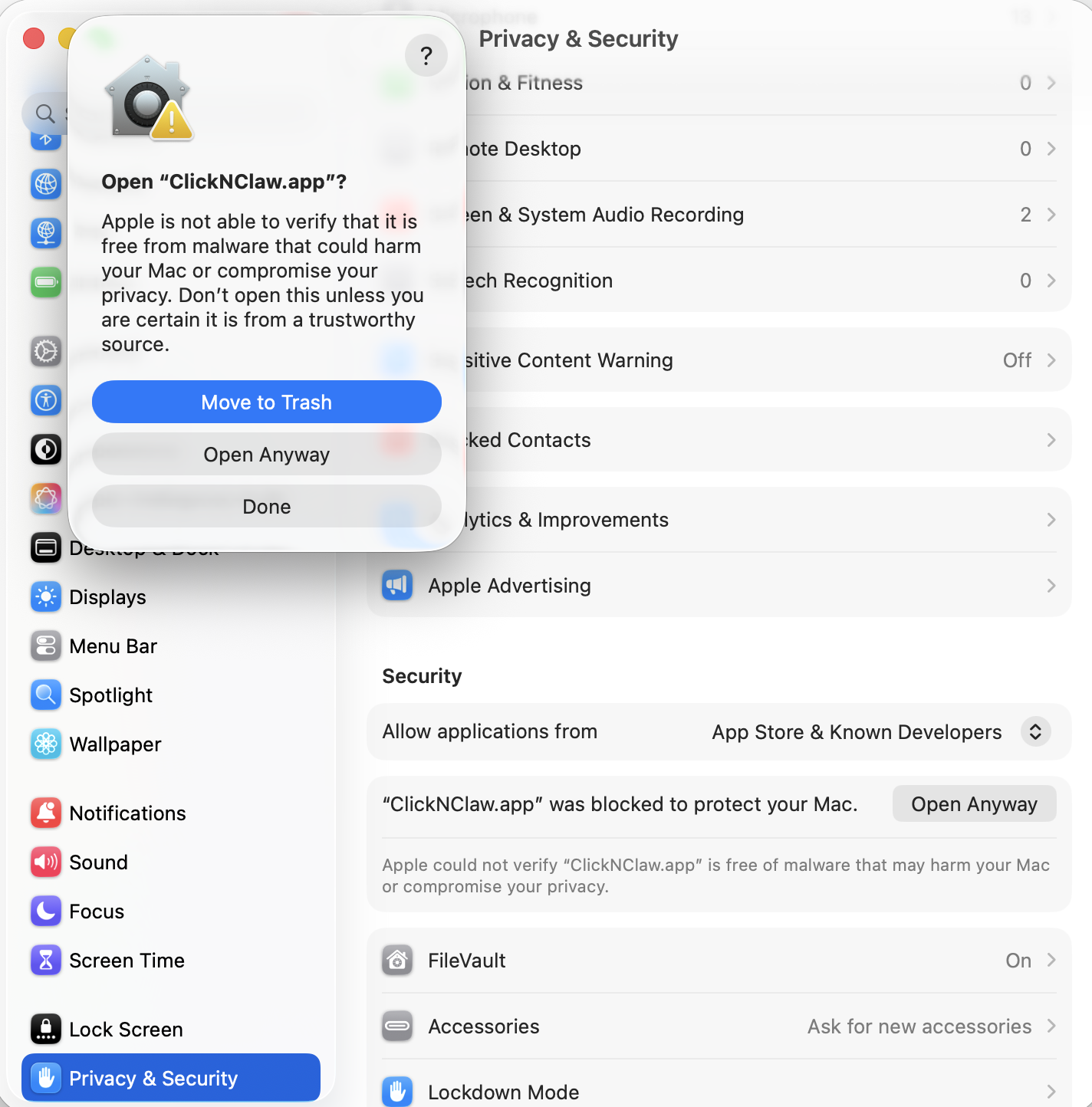
- Drag ClickNClaw from the
.dmginto Applications. - Open System Settings → Privacy & Security.
- Scroll down, click Open Anyway next to the ClickNClaw notice.
- Click Open Anyway on the popup, enter your password.
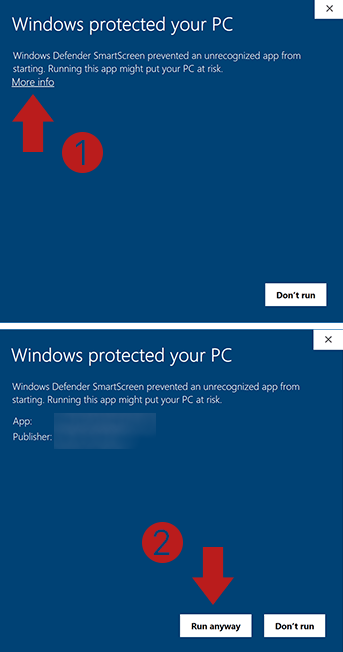
- Unzip the
.zipand double-clickClickNClaw.exe. - On the SmartScreen popup, click More info.
- Click Run anyway.
How does this work? Is my wallet safe?
Signing in only proves you own the wallet. It does not authorize transactions, approvals, or any access to your funds. The server verifies the signature, then asks a Solana RPC whether your wallet holds at least 1M ClickNClaw across its token accounts. If yes, we generate a short-lived download link that stays valid for 5 minutes. One sign-in covers every platform you want in that window, so you won't be asked again.
We never store your wallet address, signature, or balance. Each check runs fresh against the chain.
How do I install it?
macOS: open the .dmg you downloaded, then drag ClickNClaw into your
Applications folder. On first launch, right-click the app and choose Open to bypass Gatekeeper.
Windows: unzip the .zip, then double-click
ClickNClaw.exe inside. If SmartScreen warns you, click "More info" and then "Run anyway".
Linux: make the AppImage executable (chmod +x ClickNClaw-*.AppImage), then
double-click it or run it from your terminal. On Ubuntu 22.04 and newer you may first need
sudo apt install libfuse2.
I installed ClickNClaw but it's not responding to my messages.
ClickNClaw doesn't ship with a built-in model. You need to connect one first. Open Settings > Model to paste API keys from any cloud provider (OpenAI, Anthropic, Gemini, and more) or to load free local models from the same page. If you want the quickest zero-cost start, Settings > Gemini lets you sign in with a Google account for free access to Gemini without any API key.